
Aquifer’s reporting provides easy access to student usage and performance data in a flexible and fully customizable format to meet your needs.
What data is available? Who can see student data?
|
Program Service, Curriculum & IT Administrators |
Lead Course Administrator |
Course Manager |
|
|
Total Completions |
✓ | ✓ | For students in user-created courses |
| Case completion status - Not started - In progress - Low time (completed time is < 25% of recommended) - Completed |
✓ | For students & content in user created courses For all students in designated signature courses Limited view (check mark without low time designation) for all other content |
For students & content in user-created courses |
| Student case work - Time on case - Summary statement (submitted by student for cases with this feature) - Date and time completed - Date started - Date last accessed |
✓ | For students & content in user created courses For all students in designated signature courses |
For students & content in user-created courses |
| Implications for Workup / Management (submitted by students for Integrated Illness Scripts only) | ✓ | For students & IIS in user created courses | For students & content in user-created courses |
|
Case details |
✓ | ✓ | ✓ |
| Calibrate performance - Individual students - Cohorts - Multi-cohort/discipline |
✓ | For all assessments in designated disciplines | X |
| PracticeSmart performance - Cohort/student group performance - Program/institution performance |
✓ | ✓ | ✓ |
* The roles of "Teacher" and "Student Roster Manager" do not have access to the above data.
What reports are available?
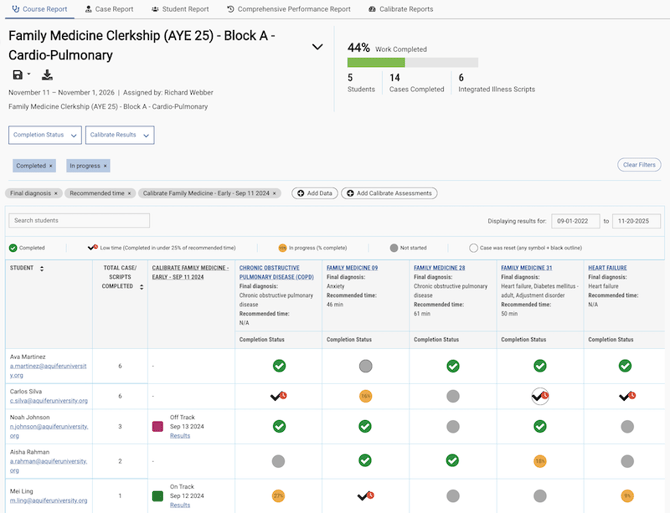
Course Report
How it helps:
-
Includes only the students and content that you need (for user-created courses)
-
Provides a detailed view of student case work and performance- including any relevant Calibrate assessments.
Available to:
-
All courses: Program Service Administrators, Curriculum Administrators, IT administrators
-
Your courses/courses you are added to, designated signature courses: Lead Course Administrator
-
Your courses/courses you are added to: Course Manager
Customization options:
-
Add data for student case work or case details to meet your reporting needs - for example, compare time on case with recommended time, track what cases include social determinants of health topics, view summary statements, or add patient age or clinical location to your report.
-
Add any or all Calibrate assessments to view student performance side by side with case completions.
- Share data via magic link with any user, or export data in your customized format.
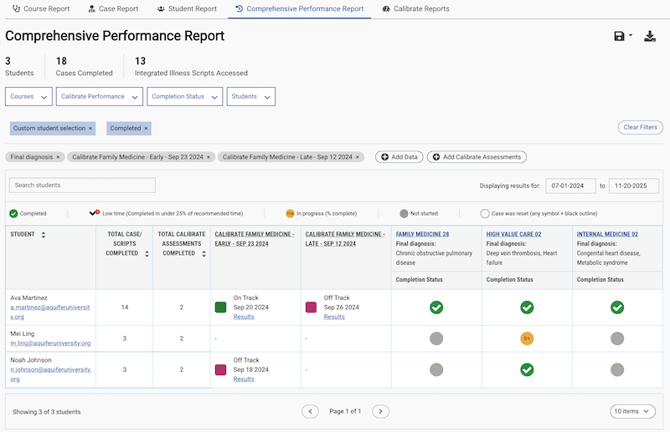
Comprehensive Performance Report
How it helps:
-
Provides a complete view of all student work across the Aquifer learning system - not siloed by course.
-
Allows users to customize the format of the report to meet their own specific reporting needs for accreditation or institution reporting.
Available to:
Program Service Administrators, Curriculum Administrators, Lead Course Administrators (limited view for content outside designated courses), IT administrators
Customization options:
-
Add data for student case work or case details to meet your reporting needs.
-
Add any or all Calibrate assessments to view student performance side by side with case completions.
-
Filter by student group or course to view details for a subset of students.
- Share data via magic link with any user, or export data in your customized format.
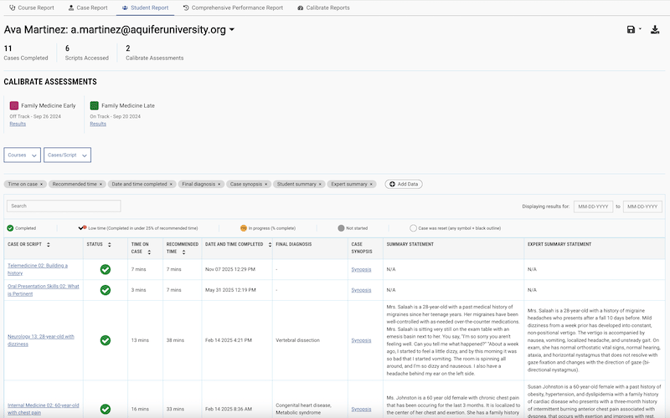
Individual Student Report
How it helps:
-
View the full student portfolio of all work completed in Aquifer, complete with case details and Calibrate results.
-
Perfect for remediation, preparing for mid-clerkship feedback, or informing a coaching session.
-
Easy case log with final diagnosis, completion status, and time on case data.
-
Easy comparison of student vs. expert summary statements for assessment.
Available to:
-
All students: Program Service Administrators, Curriculum Administrators, Lead Course Administrators (limited view for content outside designated courses), IT administrators
-
Students in user-created courses: Course Managers
Customization options:
-
Add data for student case work or case details to meet your reporting needs.
-
Add any or all Calibrate assessments to view student performance side by side with case completions.
-
Filter by student group or course to view details for a subset of students.
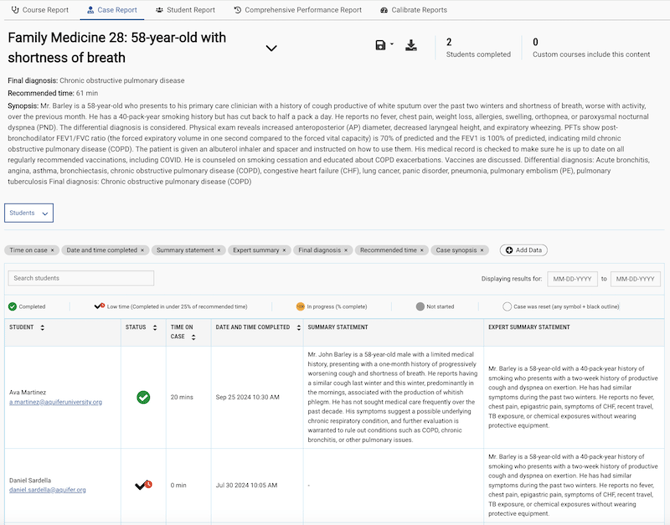
Case/Script Report
How it helps:
-
View full use of an individual case or Integrated Illness Script
-
Easy comparison of student vs. expert summary statements for assessment
Available to:
-
All content: Program Service Administrators, Curriculum Administrators, Lead Course Administrators (limited view for content outside designated courses), IT administrators
-
Content in user-created courses: Course Managers
Customization options:
-
Add data for student case work or case details to meet your reporting needs.
-
Filter by student group to view details for a subset of students.
Calibrate Reports
Calibrate reports provide extensive detail on student performance and curricular analysis. Learn more.
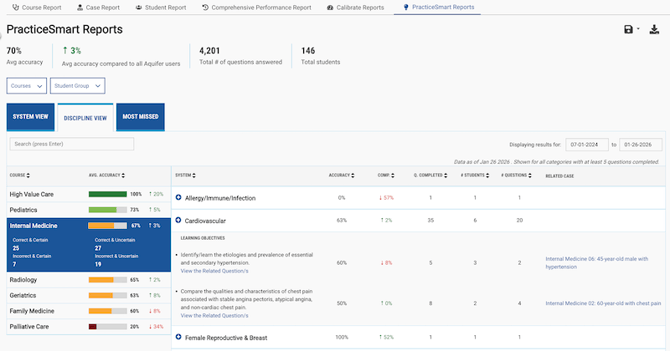
PracticeSmart Reports
How it helps:
-
Identify curricular gaps based on student quiz performance by body system or discipline, down to the learning objective level.
-
Easily take the next step to address gaps by assigning the related case for each learning objective.
-
Gain context through easy comparison metrics to help you understand how your students perform compared to all other Aquifer users.
-
Sort and filter by course or student group to view targeted data.
Available to:
-
All faculty and administrative users except Teachers
Customizable options:
-
Filter by course or group of students.
-
Drill down to the learning objective level for detailed results.
-
Filter by date range.
-
Save a custom view by name for easy access from the Reports page.
-
Share data via magic link with any user, or export data in your customized format.
Program Usage Report
How it helps:
- Understand your school’s usage across your program to understand the value your students and faculty are getting from Aquifer’s content and assessments.
- Clear next steps to help you make the most of your subscription.
- Reach out to colleagues to share information with our easy to use email templates.
Available to:
- Program Service Administrators, Curriculum Administrators
Features & Customization Options:
-
Share data via magic link with any user, or export data in your customized format.
-
Easily save and export your view.
-
Take action on your usage tips in one click with our email templates to share key information about your subscription with your colleages.
-
Filter by date range.