
During activation, your Program Service Administrator will review program contacts, assign key roles, and make sure the right faculty and administrators have the access they need. Most programs can complete this in about 10 to 15 minutes. Completing activation helps ensure faculty can access Aquifer from day one, new students can be added when the academic year begins, and your team has the correct access for reporting, assessments, and program administration.
Activation Steps
-
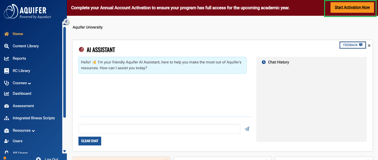
Access the activation option from your home page.
-
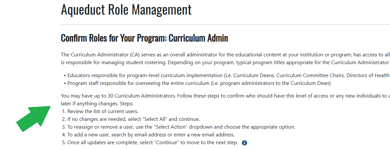
Read the directions for completing the activation at each step.
-
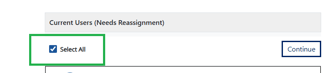
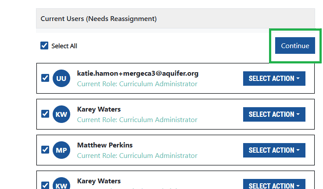
Review the list of users and make any necessary updates
- If no changes are necessary: Click the "Select All" button then the "Continue" button.
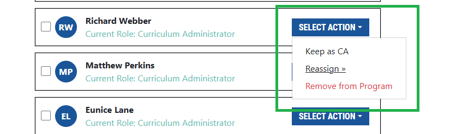
- To reassign or remove a user: Navigate to the user, click the "Select Action" button, choose the appropriate option from the dropdown menu.
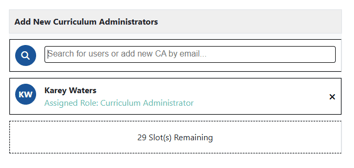
- To add a user: Search the user in the in the search field or type a new email address.
- If no changes are necessary: Click the "Select All" button then the "Continue" button.
- Once the updates are complete, review your changes or selections and click the "Continue" button at the bottom of the page to move to the next step.
- Repeat for each role until you complete the activation. You'll know you've completed the activation when you are shown the confirmation completion message and the banner for your activation prompt is not longer visible.

FAQ
What is Annual Account Activation?
Annual Account Activation is a yearly guided process where your program reviews contact information and assigns roles for the new academic year. This helps Aquifer keep your program’s administrative contacts current and ensures the right people have the right access.
Why do I need to complete activation?
Completing activation helps your program avoid access issues at the start of the academic year. It ensures faculty can access Aquifer, helps your team use the full value of your subscription, supports appropriate access to student data and reporting, and reduces last-minute troubleshooting.
Who should complete activation?
The Program Service Administrator is expected to complete activation. The PSA manages and updates contact information after subscription confirmation, including assigning key roles such as Curriculum Deans and Lead Course Administrators. However, a PSA has the ability to delegate the activation completion to a faculty member with the Aquifer role of Curriculum Administrator once the activation process has been started.
What if I am not the right person to complete activation?
If you are not the best person to complete activation, you will have the option to delegate it to a colleague.
Where can I find information about user roles and permissions?
You can review Aquifer’s user roles and permissions in our Knowledge Base article on User Roles and Permissions.
This article explains the different roles available in Aquifer and what each role allows a user to see or do. During Annual Account Activation, use this guidance to help determine which roles to assign based on each person’s responsibilities, such as program administration, course management, coordination, IT administration, or reporting.
If you are unsure which role is appropriate after reviewing the article, contact Aquifer Support and we can help guide you.
How long does activation take?
Most programs can complete activation in about 10 to 15 minutes.
What will I need to do during activation?
You will log in, follow a few guided steps, review your program contacts, and assign roles such as Curriculum Administrators and Lead Course Administrators.
Can I save my progress and come back later?
Yes. Your progress will be saved along the way, so you can complete activation in one sitting or return to it later.
When does activation need to be completed?
Activation must be completed before the new academic year begins so your faculty and administrators have full access.
What happens if activation is not completed?
If activation is not completed before the start of the academic year, your program is a risk of being unavailable for access.
Will this affect faculty access?
Yes. If activation is not completed before the new academic year begins, faculty access for the new academic year will be unavailable until activation is complete.
I am receiving a “not authorized” message. What should I do?
Contact Aquifer Support so we can review your access.
I cannot add faculty. What should I do?
Contact Aquifer Support. Support may need to investigate your account or permissions.
What do I do after activation?
After completing your activation, you should take the opportunity to review how to Make the Most of Your Aquifer Subscription. This is also an important page to share with any new faculty members you added during the activation. This page contains helpful resources to get your new faculty acclimated to Aquifer.